100-Build Progress Tracker
What it does for you
A read-only command center over the sprint's single source of truth, with a deterministic CLI that keeps it in sync.
In more detail
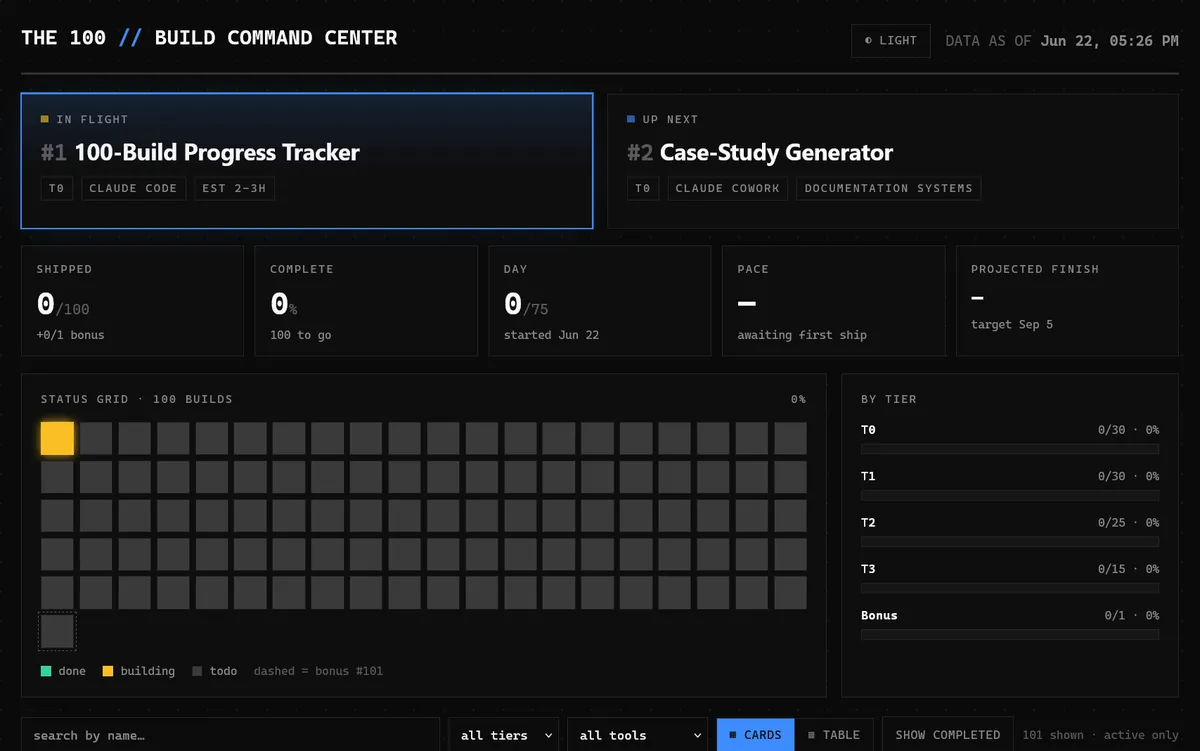
The scoreboard for the whole sprint. It's one web page that reads my tracker file and shows every project's status, how many have shipped, my pace, and what's up next. A 100-project build dies from losing track, not from any one hard project, so this came first.
Honest limits
No automated test file is recorded for this one. The checks Claude ran during the build were one-time runs, not a verify.mjs that lives in the folder. Closing out a project still took a CLI call plus a manual CSV edit, which leaves a gap in the single-writer rule. It runs locally.
How I built it
Day one, project one, in Claude Code. Before I built anything I set up the system: a CLAUDE.md master context, the 00-system/ knowledge base, a project template folder, and tracker.csv as the single scoreboard. Claude Code read CLAUDE.md and the loop playbook, picked the lowest todo (which was this project), and built two pieces: a one-file dashboard (index.html) and a small Node CLI, track.mjs, that is the only thing allowed to write to the CSV. Before I even looked, it had checked that the page served, the CSV math added up, the file round-tripped byte for byte, and the one-project-in-flight rule held.
Then I steered the design. The first direction came from a design skill tuned for landing pages, which is wrong for a data-dense dashboard, so we switched to the redesign and high-end skills. That gave me a dark brutalist theme and a high-contrast light one, rectangle cards by default with a table toggle, a 10 by 10 status grid, and a glowing strip for what's in flight and up next. The plan said React and Tailwind. I swapped that for zero-dependency vanilla HTML and JS, because a one-file command center doesn't need a build step. About 3 hours.
What I learned
- A dashboard is only as good as the source of truth behind it. Making
tracker.csvcanonical and the UI read-only removed the whole "which copy is right" problem. - One deterministic write path beats hand-editing.
track.mjspreserves line endings, only quotes when it has to, and refuses a second in-flight project, so the tracker can't quietly drift. - Status lives in the file, not the tool. Claude caught that, and we wrote down a rule that Claude Cowork projects edit the CSV directly, so the system holds no matter which tool built the project.
- Design skills work best as a brief, not a button. The skill telling me it was meant for landing pages is what pointed me to the right one.
What carried forward
The tracker stayed the single scoreboard for all 100 projects, whether Claude Code, Claude Cowork, or Codex built them. When Codex joined in September, we kept the same principle and made it stricter: each builder wrote a LOG-ENTRY.json in its own project folder and never touched the tracker, and Claude Code merged the entries after checking them. One writer, same as track.mjs. The tracker also fed #4's landing page, and later the portfolio site (#96), which joins every case study with tracker.csv for status and dates.
If I took it further
I'd add a capture command to track.mjs so closing a project (status, date, case study flag, hours) is one command. That closes the gap and keeps the single-writer rule airtight.
#001 Built with Claude Code June 22, 2026